Add human-in-the-loop checkpoints to your AI agent or automation in minutes. Authenticate, create a checkpoint, share the review link, and receive the decision via webhook.
Interactive Explorer
Browse all endpoints, try requests live, and inspect response schemas with the Swagger UI.
Get your first checkpoint live in three steps:
/api/checkpoints
with a title, instructions, and optional
callback_url
review_link
with a human — they click Approve or Reject and your webhook fires
curl -X POST https://relayna.app/api/checkpoints \
  -H "Authorization: Bearer $RELAYNA_API_KEY" \
  -H "Content-Type: application/json" \
  -d '{
    "title": "Approve deployment to production",
    "instructions": "Review the diff and confirm it is safe to deploy.",
    "callback_url": "https://yourapp.com/webhooks/relayna"
  }'

# Response
{
  "checkpoint": {
    "id": "550e8400-e29b-41d4-a716-446655440000",
    "public_id": "aB3xYz7qRstUvW",
    "status": "pending",
    "title": "Approve deployment to production",
    "ttl_seconds": null,
    "expires_at": null,
    "inserted_at": "2026-04-01T10:00:00.000000Z"
  },
  "review_url": "https://relayna.app/r/k3Hq9mXzP2...",
  "link": { "id": "...", "status": "active", "ttl_seconds": 604800, "expires_at": "2026-04-08T10:00:00.000000Z" }
}Build and test real API requests with live preview, pre-filled mock data, and response inspection — no terminal needed.
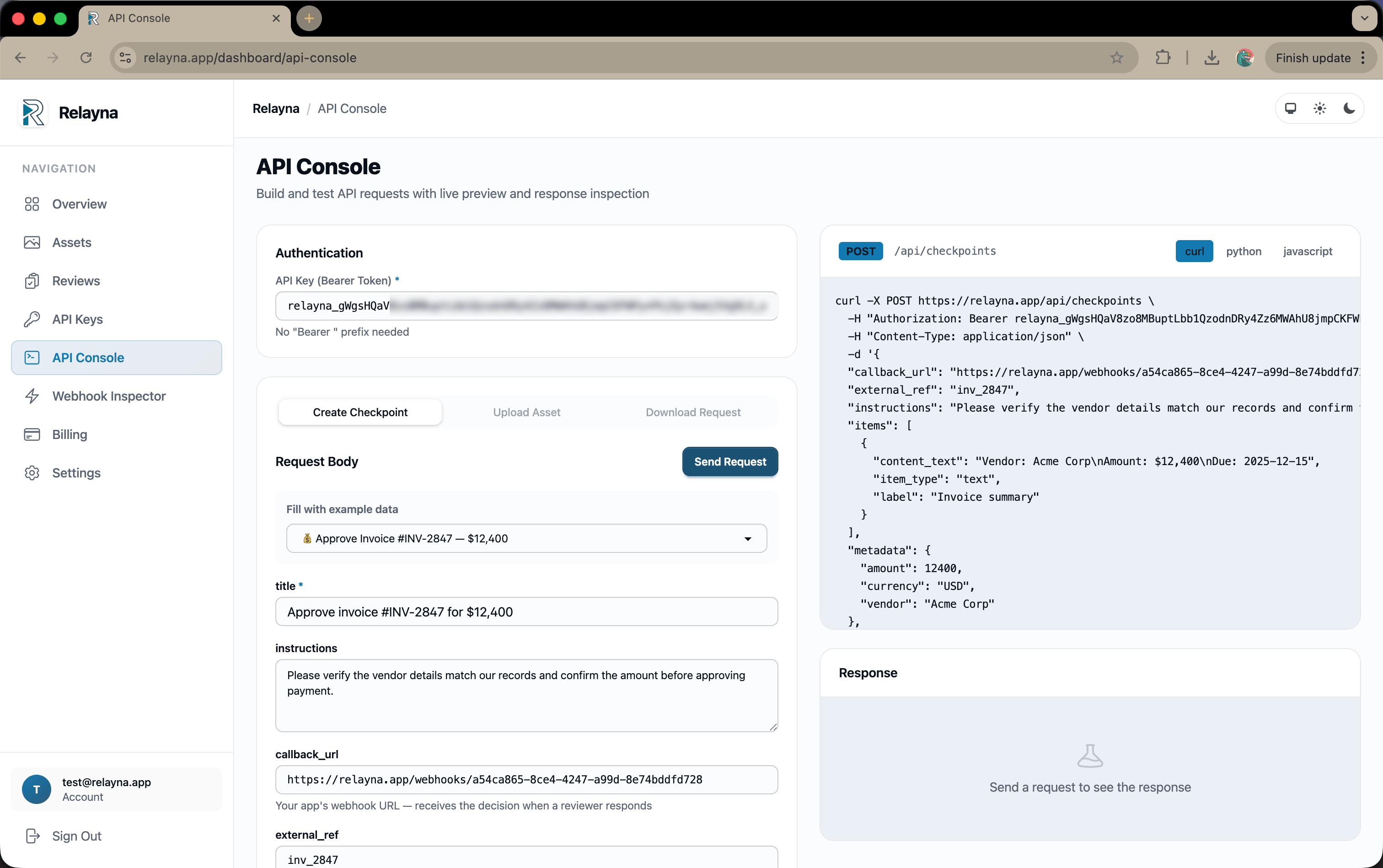
All API requests must include your API key as a bearer token in the
Authorization
header. Create and manage keys in Dashboard → API Keys.
Authorization: Bearer YOUR_RELAYNA_API_KEY
Content-Type: application/json
/api/checkpoints
Creates a new review checkpoint and returns a magic review link. Optionally attach files, text snippets, JSON data, or external URLs as review items.
title
string
required
Short summary shown to the reviewer as the checkpoint title.
instructions
string
Detailed instructions or context for the reviewer. Rendered as a highlighted callout on the review page.
summary
string
Optional one-line summary or context shown below the title.
callback_url
string
HTTPS URL that receives a POST with the decision the moment the reviewer acts. Retried up to 3 times on failure.
callback_headers
object
Extra headers sent with every webhook POST to callback_url (e.g. {"Authorization": "Bearer secret"}).
ttl_seconds
integer
Seconds until the checkpoint auto-expires. After this time the checkpoint transitions to expired and the review link stops working.
external_ref
string
Your own identifier (e.g. a job ID or order number). Echoed back in the webhook payload.
metadata
object
Arbitrary key/value pairs stored with the checkpoint and included in the webhook payload.
submitted_by
string
Free-form label identifying the agent or system that created this checkpoint (e.g. "n8n-workflow").
items
array
List of items to attach for the reviewer to examine. See item types below.
Each item in the
items
array must include an
item_type
and optional label.
"asset"
— asset_id: string
A previously uploaded file. The reviewer sees the filename and a download button.
"text"
— content_text: string
Inline text block displayed directly on the review page.
"json"
— content_json: object
JSON data rendered as syntax-highlighted code.
"link"
— content_text: string (URL)
An external URL shown as a clickable link. Pass the URL in content_text.
Files upload directly to Cloudflare R2 — Relayna is never in the data path. There are two upload methods:
/api/assets/upload
multipart/form-data
Simple server-side upload. Send the file as a multipart form field named file.
curl -X POST https://relayna.app/api/assets/upload \
  -H "Authorization: Bearer $RELAYNA_API_KEY" \
  -F "[email protected]" \
  -F "purpose=invoice" \
  -F "ttl_seconds=604800"

# Returns
{
  "asset": {
    "id": "550e8400-e29b-41d4-a716-446655440000",
    "filename": "invoice.pdf",
    "content_type": "application/pdf",
    "byte_size": 142336,
    "status": "uploaded",
    "purpose": "invoice",
    "ttl_seconds": 604800,
    "expires_at": "2026-04-08T10:00:00.000000Z",
    "uploaded_at": "2026-04-01T10:00:00.000000Z",
    "inserted_at": "2026-04-01T10:00:00.000000Z"
  },
  "access_url": "https://r2.example.com/...",
  "access_url_expires_at": "2026-04-08T10:00:00.000000Z"
}For large files or client-side uploads, request a presigned PUT URL. The file goes directly to R2; only the asset ID is stored in Relayna.
/api/assets/upload
with
{"presigned": true, "filename": "invoice.pdf", "content_type": "application/pdf"}
— returns
upload_url
and
asset_id
upload_url
asset_id
in your checkpoint's
items
array
/api/assets/:id/download-request
Generates a short-lived presigned GET URL for an uploaded asset. Use this to give reviewers or downstream services temporary access to a file without exposing permanent storage credentials.
{
  "download_url": "https://r2.example.com/...",
  "expires_in_seconds": 3600,
  "asset": { "id": "...", "filename": "invoice.pdf", "status": "uploaded", ... }
}
/api/checkpoints/:id
Returns the full checkpoint including all attached items. Asset items include a short-lived presigned access_url.
{
  "id": "550e8400-e29b-41d4-a716-446655440000",  // UUID
  "public_id": "aB3xYz7qRstUvW",                 // short URL-safe ID
  "status": "pending",              // pending | approved | rejected | needs_changes | expired | cancelled
  "title": "Approve deployment",
  "instructions": "...",
  "summary": null,                  // optional one-line context
  "review_type": "ad_hoc",
  "callback_url": "https://yourapp.com/webhooks/relayna",
  "ttl_seconds": 604800,
  "expires_at": "2026-04-08T10:00:00.000000Z",   // null if no TTL
  "external_ref": "job_abc123",
  "metadata": { "env": "production" },
  "submitted_by": "my-agent",       // null if not set
  "decided_at": null,               // ISO 8601, set when reviewer acts
  "decision_comment": null,         // reviewer's comment
  "inserted_at": "2026-04-01T10:00:00.000000Z",
  "items": [
    {
      "id": "550e8400-...",
      "item_type": "asset",         // asset | text | json | link
      "label": "Invoice PDF",
      "asset_id": "550e8400-...",
      "content_text": null,
      "content_json": null,
      "position": 0,
      "access_url": "https://r2.example.com/...",           // asset items only
      "access_url_expires_at": "2026-04-08T10:00:00.000000Z"
    }
  ]
}
/api/checkpoints/:id/cancel
Cancels a pending checkpoint (e.g. the workflow was aborted). Only pending checkpoints can be cancelled. Returns the updated checkpoint object.
curl -X POST https://relayna.app/api/checkpoints/$CHECKPOINT_ID/cancel \
  -H "Authorization: Bearer $RELAYNA_API_KEY"
/api/review-links/:id/revoke
Revokes a review link so it can no longer be used. The checkpoint itself remains accessible via the API. Returns the updated link status.
{ "link": { "id": "...", "status": "revoked" } }
When a reviewer acts, Relayna immediately POSTs this payload to your callback_url. Retried up to 3 times with exponential backoff on non-2xx responses.
{
  "checkpoint_id": "550e8400-e29b-41d4-a716-446655440000",
  "public_id": "aB3xYz7qRstUvW",
  "status": "approved",             // approved | rejected | needs_changes | expired | cancelled
  "decision": "approve",            // "approve" | "reject" | "needs_changes" | null (null when expired/cancelled)
  "comment": "Looks good, vendor details match.",
  "decided_at": "2026-04-01T14:32:00.000000Z",
  "external_ref": "job_abc123",     // echoed from checkpoint creation
  "metadata": { "env": "production" }
}
external_ref
to correlate the webhook with your internal job or workflow ID — no database lookup needed.
If you cannot receive webhooks, poll the lightweight status endpoint instead.
/api/checkpoints/:id/status
{
  "id": "550e8400-e29b-41d4-a716-446655440000",
  "public_id": "aB3xYz7qRstUvW",
  "status": "approved",
  "decided_at": "2026-04-01T14:32:00.000000Z",
  "decision_comment": "Looks good.",
  "external_ref": "job_abc123"
}curl -X POST https://relayna.app/api/checkpoints \
-H "Authorization: Bearer $RELAYNA_API_KEY" \
-H "Content-Type: application/json" \
-d '{
"title": "Approve deployment to production",
"instructions": "Review the diff and confirm it is safe to deploy.",
"callback_url": "https://yourapp.com/webhooks/relayna",
"external_ref": "deploy_20251119",
"items": [
{
"item_type": "text",
"label": "Diff summary",
"content": "3 files changed, 42 insertions, 5 deletions"
}
]
}'Webhooks are instant and stateless. Only poll if you cannot expose a public endpoint (e.g. local dev).
Pass your internal job or order ID as external_ref. It's echoed in the webhook so you never need a reverse lookup.
Always set a sensible TTL so stale checkpoints don't linger. Checkpoints auto-expire after the TTL; poll /status or use webhooks to detect expiry.
The more context reviewers have (files, inline data, clear instructions) the faster and more accurate their decision.
Create one API key per agent or service. If a key is compromised, rotate only that key without affecting others.
Your callback_url fires on approved, rejected, and needs_changes. Poll /status to detect expired or cancelled states. Handle all outcomes, not just approved.